
PeerClip · Cross-device clipboard synchronization
Deploy once and use it across multiple devices. Bring your PC, Mac, iPhone, Android, and tablet into the same "room" and paste text, pictures, and files at will.
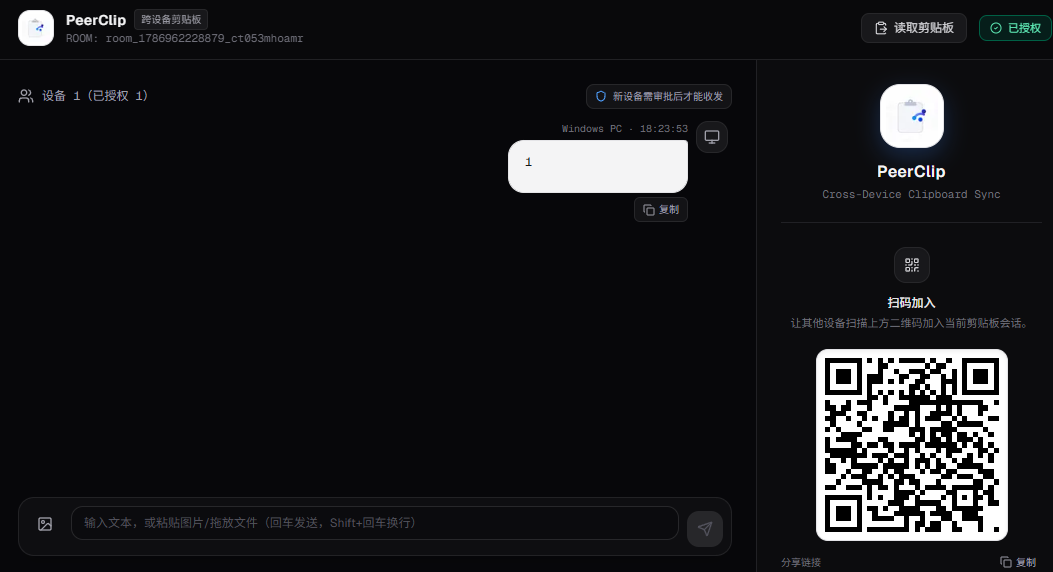
Project introduction
PeerClip is a temporary file and clipboard transfer tool for multi-device scenarios.
It does not require the installation of a native client. You only need to open a browser to add PC, Mac, iPhone, Android, tablet and other devices to the same room, and quickly synchronize text, pictures and files between devices.
The project uses a “room + equipment approval” mechanism to manage access rights, and uses QR codes to reduce the operating cost of joining a room on the mobile terminal. Text messages are persisted through Redis, and images and files are stored using Cloudflare R2 and delivered directly from the browser through pre-signed URLs.
✨ Core Features
🔗 Room Mechanism
A unique room ID is automatically generated when PeerClip is opened for the first time, and the current room is identified by ?room=xxx in the URL.
Just share the room link or let other devices scan the QR code on the page to quickly join the same space.
📱 QR code to join quickly
The room QR code is built into the page.
There is no need to manually enter the room number on your mobile phone or tablet, you can directly scan the code to enter the current room, which is very suitable for temporary transfer of content between computers and mobile phones.
🔐 Equipment Approval
In order to prevent unfamiliar devices from joining when the room link is mistakenly shared, PeerClip has introduced a device approval mechanism.
- The first device to enter the room automatically becomes the administrator
- Subsequent devices are in the
pendingstate by default - Admin can choose
ApproveorReject - Only approved devices can view and send room content
While keeping it simple to use, it also adds a layer of basic access control.
📝 Instant text synchronization
Type or paste text from any device and send the message to other approved devices.
At the same time, a one-click copy button is provided to directly copy the content back to the system clipboard of the current device.
For temporary transfers:
A piece of code, a command, a link, and a configuration can all be thrown directly into the room.
🖼️Multiple picture transfer
Supports selecting multiple images at one time and displaying them in a card carousel.
The mobile terminal also adds touch operations for image preview:
- Double click to enlarge/restore
- Drag pictures with one finger
- Pinch to zoom with two fingers
- View full screen
It is especially convenient for scenarios such as taking screenshots from a computer and transferring them to a mobile phone.
📎 Universal file upload
In addition to images, other types of files are also supported, such as:
- compressed package
- PDF/Document
- Video
- code files
- Other common files
Files are displayed as cards, providing file type, size, and download operations.
☁️ Cloudflare R2 pre-signed direct transfer
Images and files do not go through the Next.js Serverless Function first, but instead:
浏览器
  ↓
请求上传地址
  ↓
Next.js / Vercel 生成 Presigned URL
  ↓
浏览器直接 PUT
  ↓
Cloudflare R2
This method can avoid file uploads being transferred through the server, and at the same time, R2’s Access Key will not be exposed to the front end.
The project currently has restrictions on image and file size:
- Image: ≤ 10 MB
- File: ≤ 50 MB
⚡ Optimistic update + polling
Instead of using a complex WebSocket architecture, PeerClip uses polling to get the latest news.
To avoid appearing after sending a message:
Send → Disappear → Reappear
The visual beat, the front end uses the method of optimistic update + merging polling results by ID.
After the user sends the message, it is immediately displayed in the interface, and the server data is polled in the background before merging.
At the same time, the message ID list and length are compared during polling. If the data has not changed, skip setState to reduce unnecessary rendering.
🤖 Online device management
The device sends heartbeats periodically.
If a device has no heartbeat for a certain period of time, the system will automatically clear it to prevent offline devices from remaining in the device list for a long time.
💾 Redis persistence
Room, device, and message data are stored in Redis.
Therefore, even if deployed in a Vercel Serverless environment, data will not be completely lost due to function cold start or instance changes.
🛠 Technology stack
| Hierarchy | Technology | Usage |
|---|---|---|
| Framework | Next.js 16 | App Router, Pages and APIs |
| UI | React 19 | Front-end interaction and components |
| Styling | Tailwind CSS 4 | Atomic CSS |
| Language | TypeScript 5 | Type Safety |
| Icons | lucide-react | SVG icon |
| QR Code | qrcode.react | Room QR code |
| Database | Redis / ioredis | Room, equipment, message persistence |
| File Storage | Cloudflare R2 | Image and File Storage |
| Upload | Presigned URL | Browser direct transfer R2 |
| Deployment | Vercel | Serverless deployment |
The project is actually built using Next.js + React + Tailwind CSS + TypeScript. Redis is used for session and message data storage, and Cloudflare R2 is used for image and file storage. The entire project is adapted to the Vercel Serverless environment.
🚀 How to use
1. Create a room
After opening PeerClip, the system automatically creates a room.
The first device to enter the room automatically becomes the administrator.
2. Add other devices
You can copy the current room URL directly or use the QR code on the page.
Scan the code on your phone to quickly enter the room.
3. Approval of equipment
New devices are in the pending state by default after entering.
The administrator clicks Approve in the device list, and the device can officially join the room.
4. Start transfer
Then you can directly:
- Paste text
- Paste screenshot
- Select picture
- Upload files
- Copy text with one click
- Download files sent by other devices
The entire process does not require the installation of additional clients.
🏗️ Project structure
peerclip/
├─ app/
│  ├─ page.tsx
│  ├─ layout.tsx
│  ├─ globals.css
│  └─ api/
│     ├─ clipboard/
│     │  └─ route.ts
│     └─ upload/
│        └─ route.ts
├─ public/
│  └─ logo.jpg
├─ .env.example
├─ next.config.ts
├─ postcss.config.mjs
├─ eslint.config.mjs
├─ tsconfig.json
├─ package.json
└─ README.md
The core logic is mainly concentrated in two APIs:
clipboard/route.ts: responsible for message polling, device heartbeat, message sending and device approvalupload/route.ts: Responsible for generating Cloudflare R2 pre-signed upload URL
The front-end page.tsx is responsible for page UI, polling, message merging, file upload and image gesture interaction.
🔧 Run locally
The project requires Node.js 20+ and an accessible Redis and Cloudflare R2 Bucket.
git clone https://github.com/Licy711/lan-clipboard.git
cd lan-clipboard

npm install

cp .env.example .env.local

npm run dev
Then visit:
http://localhost:3000After opening it for the first time, a room will be automatically generated. Use your mobile phone to scan the QR code on the page to test cross-device synchronization.
Production environment can use:
npm run build
npm start
🔐 Environment variables
PeerClip needs to configure Redis and Cloudflare R2 related environment variables:
REDIS_URL=

R2_ACCOUNT_ID=
R2_ACCESS_KEY_ID=
R2_SECRET_ACCESS_KEY=
R2_BUCKET=
R2_PUBLIC_DOMAIN=
Among them, the R2 API Token is recommended to follow the principle of least privilege and only grant Object Read & Write permissions to the target Bucket, rather than management permissions to the entire Cloudflare Account.
☁️ Why choose R2 direct transmission?
If you directly let the browser upload the file to the Next.js API, and then forward it to the object storage from the server, the Serverless Function will become the middle layer of the file transfer.
After PeerClip adopts Presigned URL, the process becomes:
Client
  │
  │ 请求上传 URL
  ▼
Next.js API
  │
  │ 生成 Presigned PUT URL
  ▼
Client
  │
  │ 直接上传
  ▼
Cloudflare R2
This not only reduces the data transmission pressure on the server, but also avoids sending the R2 key to the browser.
It can also bypass the request body restrictions of Vercel Serverless Function.
🌐 Deployment
The project is optimized for Vercel Serverless environments, so it can be directly imported into a GitHub repository for deployment.
Basic process:
GitHub
  ↓
Vercel Import
  ↓
配置 Redis
  ↓
配置 Cloudflare R2
  ↓
Deploy
After the deployment is completed, you can bind your own domain name so that mobile phones, computers and other devices can access it directly through a fixed address.
🧩What scene is it suitable for?
PeerClip prefers temporary, lightweight, and data transfer between multiple devices.
For example:
💻 Computer → Mobile phone
Copy a piece of text, screenshot or file on your computer, open PeerClip and send it directly. Scan the QR code with your mobile phone to enter the room and get it.
📱 Mobile → Computer
If you take a photo or save a file on your mobile phone, you can upload it directly to the room and download it on your computer without transferring it through WeChat, QQ, or email.
🧑💻 Development scenario
During the development process, it is often necessary to transfer data between different devices:
URL
代码片段
JSON
Token
Shell 命令
配置文件
截图
日志
PeerClip can be used as a temporary “transit station”.
🏠 Temporary sharing between multiple devices
When using Mac, Windows, iPhone, Android and other devices at home at the same time, you can create a room for long-term use and use it as a personal cross-device clipboard.
⚠️ Notes
Since PeerClip is positioned as a temporary transfer tool, you still need to pay attention to the following points when deploying:
- R2 API Token uses the minimum permission and only authorizes the specified Bucket.
- Do not submit
.env.local, especially the Redis password and R2 Secret Access Key. - If you suspect that the key has been leaked, the old Token should be revoked immediately and regenerated.
- The browser’s system clipboard reading capability usually requires an HTTPS or
localhostenvironment. - R2 files recommend configuring Lifecycle Rules to automatically clean up files that have not been used for a long time to avoid continuous growth of storage space.
- It is not recommended to store excessively large payloads in a single message in Redis. Images and files should be given to R2.
💡 Project Highlights
The most interesting thing about PeerClip is not “making a file upload page”, but the combination of several seemingly simple problems:
**How to use a pure web application to turn different devices into a temporary shared clipboard? **
It ended up using:
Room Mechanics
→ Solve how multiple devices can enter the same space.
QR code
→ Solve the problem of troublesome entering address when joining a room on mobile phone.
Equipment Approval
→ Solve the problem of unfamiliar device access caused by shared links.
Redis
→ Solve the problem of data persistence in Serverless environment.
R2 Presigned URL
→ Solve the problem that image and file uploads should not go through Serverless Function.
Optimistic Update + Polling
→ Make the synchronization experience as close to real-time as possible without introducing WebSocket.
The technical implementation of the entire project was relatively restrained. Instead of forcibly introducing complex long-term connection infrastructure for the sake of “real-time synchronization”, a simpler polling solution was chosen based on the actual usage scenario.
📌 Summary
PeerClip is a small but complete tool for temporary cross-device transfer.
It uses the browser as a unified entrance, connects different devices through the room mechanism, and combines Redis, Cloudflare R2 and Vercel to:
Text, images, files → a room → all approved devices
This link is simple enough.
If you often need to transfer text, screenshots, and files between your computer and mobile phone, and don’t want to install additional clients, then PeerClip will be a relatively lightweight solution.
The project adopts MIT License and can be directly forked, modified and deployed by yourself.